KAI Development Platform
From ticket to production -- automated. Posts to ADO or Jira, creates AEM pages, verifies against Figma, reviews PRs, and runs 24/7 on pipelines. Built on enterprise tools, not custom code.
From Ticket to Product -- End to End
One ticket goes in -- deployed code, configured AEM pages, and documentation come out. Ready to use.
Fully Autonomous
One ticket triggers the entire pipeline. No manual steps between the assignment and a deployed, verified result. Can run unattended.
Real Deliverables
Not code suggestions — real output. Deployed AEM pages, configured components, reviewed pull requests, and structured documentation. Ready to use, not ready to start.
Team Visibility
Every step posts back to Azure DevOps or Jira — requirements, plans, reviews, and results. The team tracks progress in tools they already use. Nothing hidden, nothing new to learn.
Automated Tracker Workflow
Comments, tasks, summaries, and status updates -- posted directly to Azure DevOps or Jira. Visible to the entire team in existing tools.
/dx-req Automated Comments
Requirements analysis, implementation plans, DoR validation, and review summaries — all posted as structured comments directly to the ADO or Jira ticket.
Task Creation
AI breaks down stories into child tasks with hour estimates, creates them in ADO or Jira, and links them to the parent story. Management tracks progress in existing boards.
PR with Full Review
Pull requests created with structured descriptions, linked to work items. Every PR reviewed automatically with inline patches and fix suggestions.
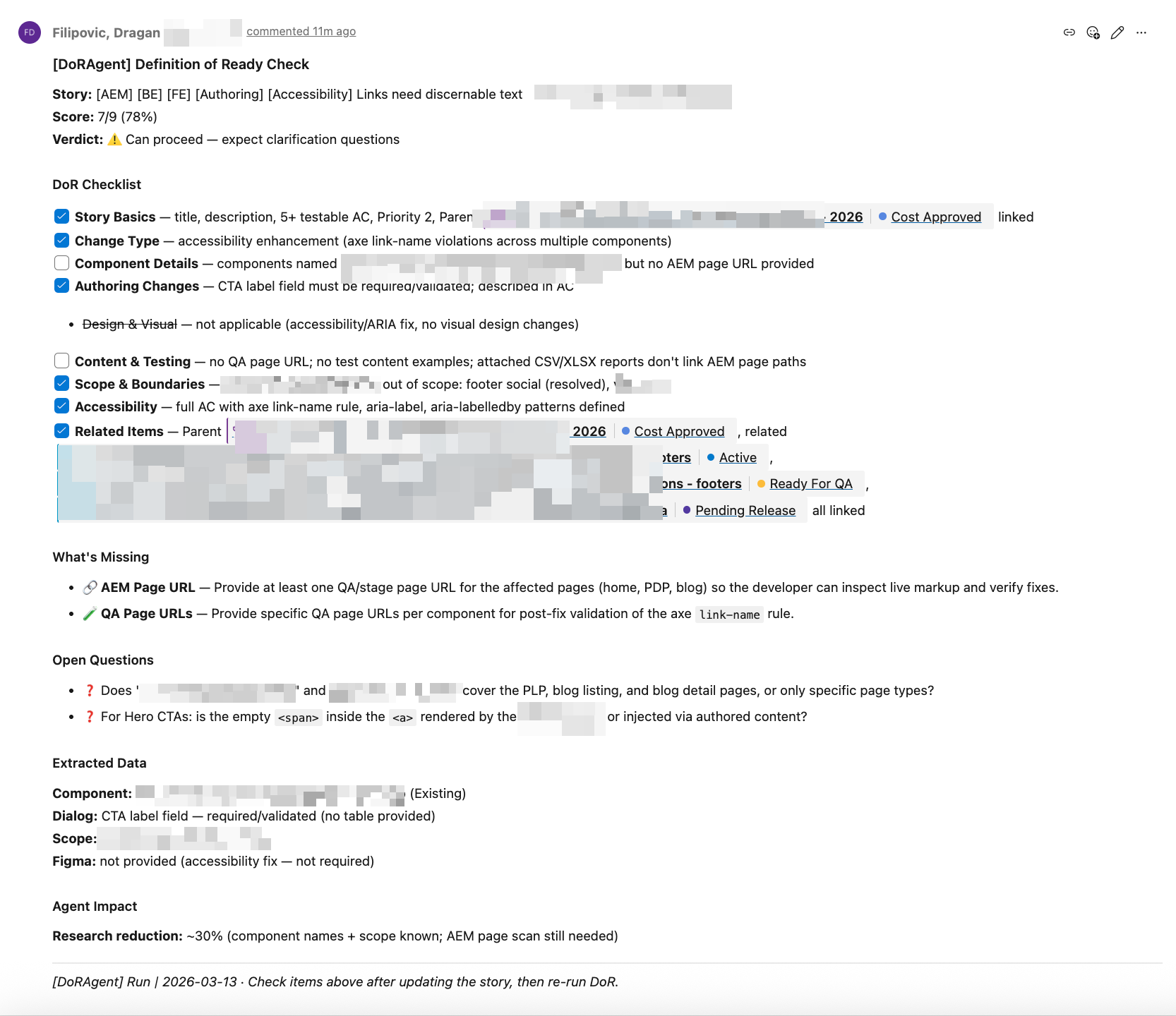
DoR Check Comment in ADO
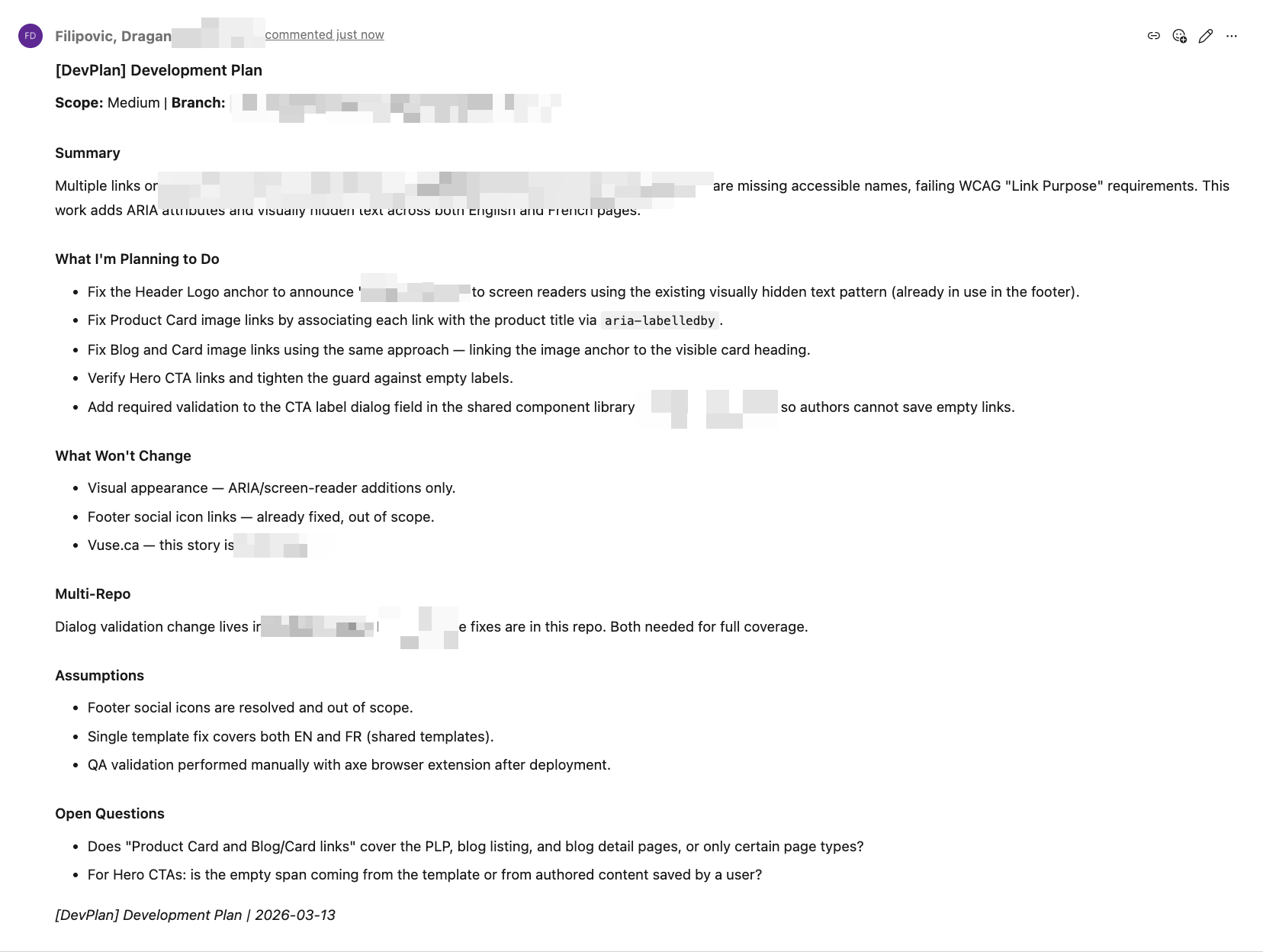
Development Plan — Team Share in ADO
AEM Pages & Figma Verification
AI creates real AEM pages, configures components, and verifies the result against Figma designs in a real browser.
AEM Page Creation
AI creates AEM pages, configures component dialogs, sets content properties, and verifies the result on a running AEM instance. Not a code generator — it works with the live CMS.
Figma-to-Code with Browser QA
One command extracts a Figma design, generates a prototype, opens it in a real browser, takes a screenshot, compares it against the Figma reference, and auto-fixes differences.
/dx-figma-all <figma-url> /dx-figma-extract /dx-figma-prototype /dx-figma-verify /dx-plan + /dx-step-all Design Fidelity
Design fidelity is verified before production code starts. AI maps Figma tokens to existing SCSS variables, uses the project’s BEM naming, and generates WCAG-compliant patterns.
Works with Any Figma
Works exceptionally with well-structured Figma files, adapts intelligently to hybrid designs, and even handles screenshot-based files — every team’s Figma workflow is supported.
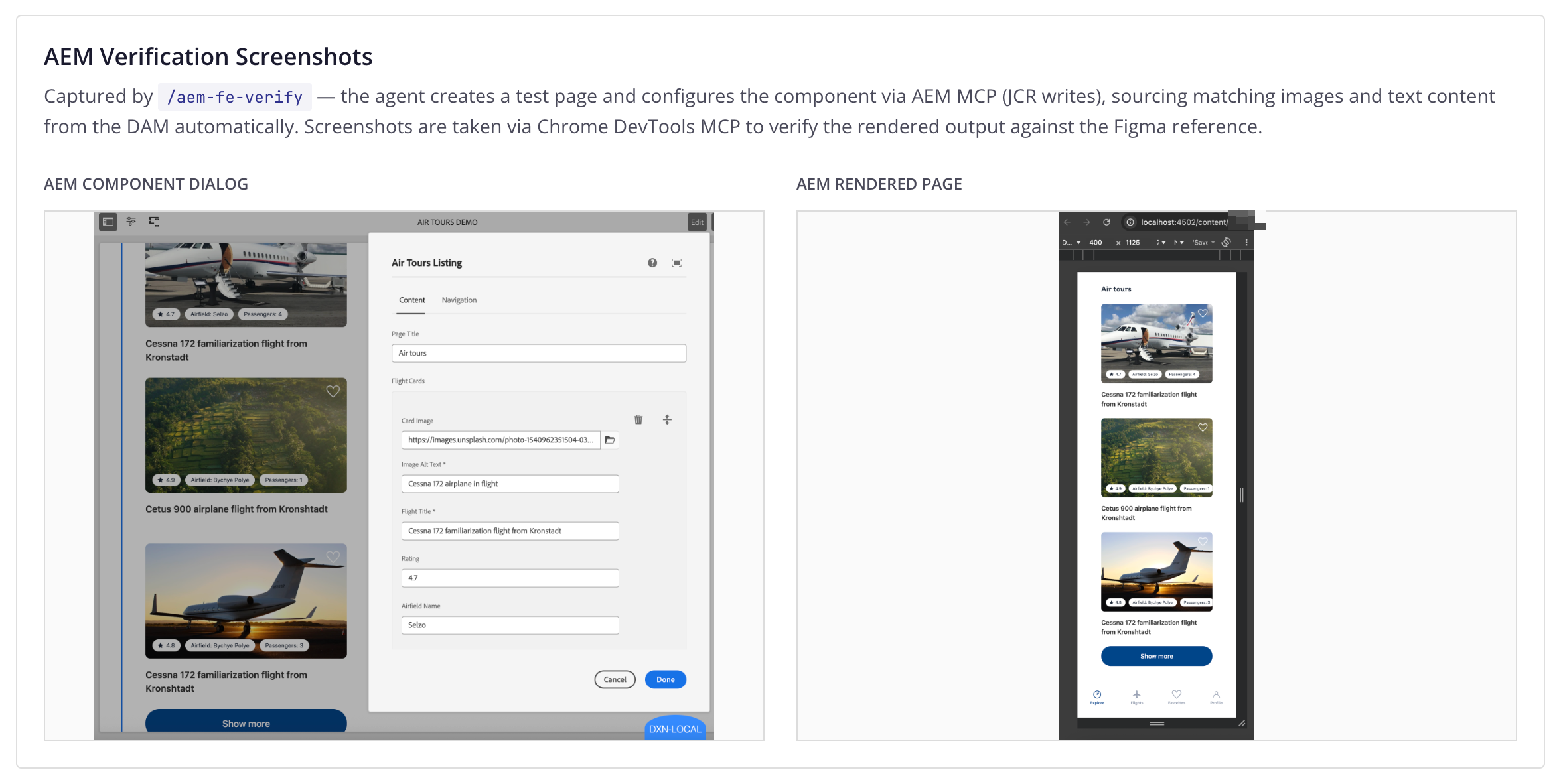
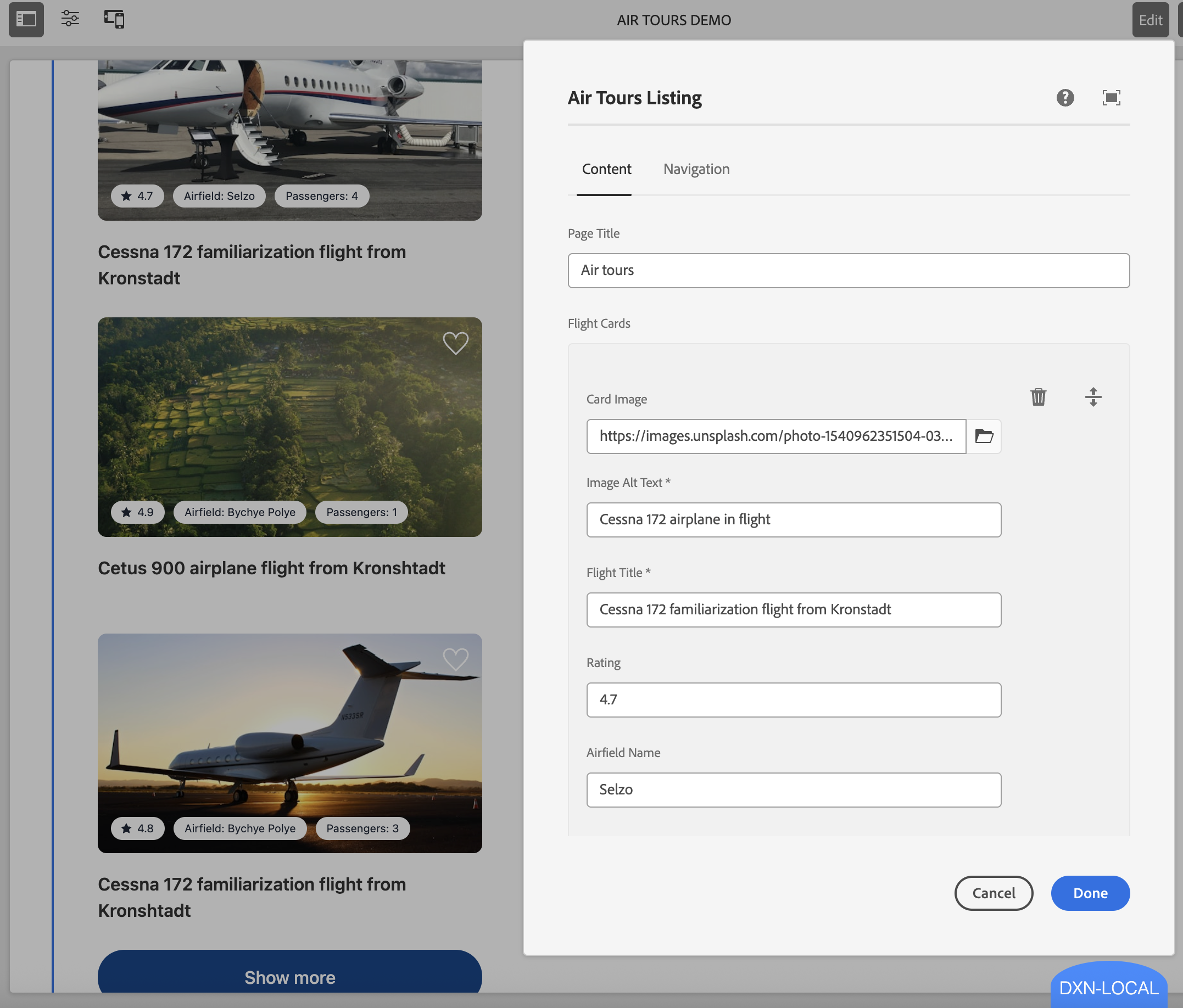
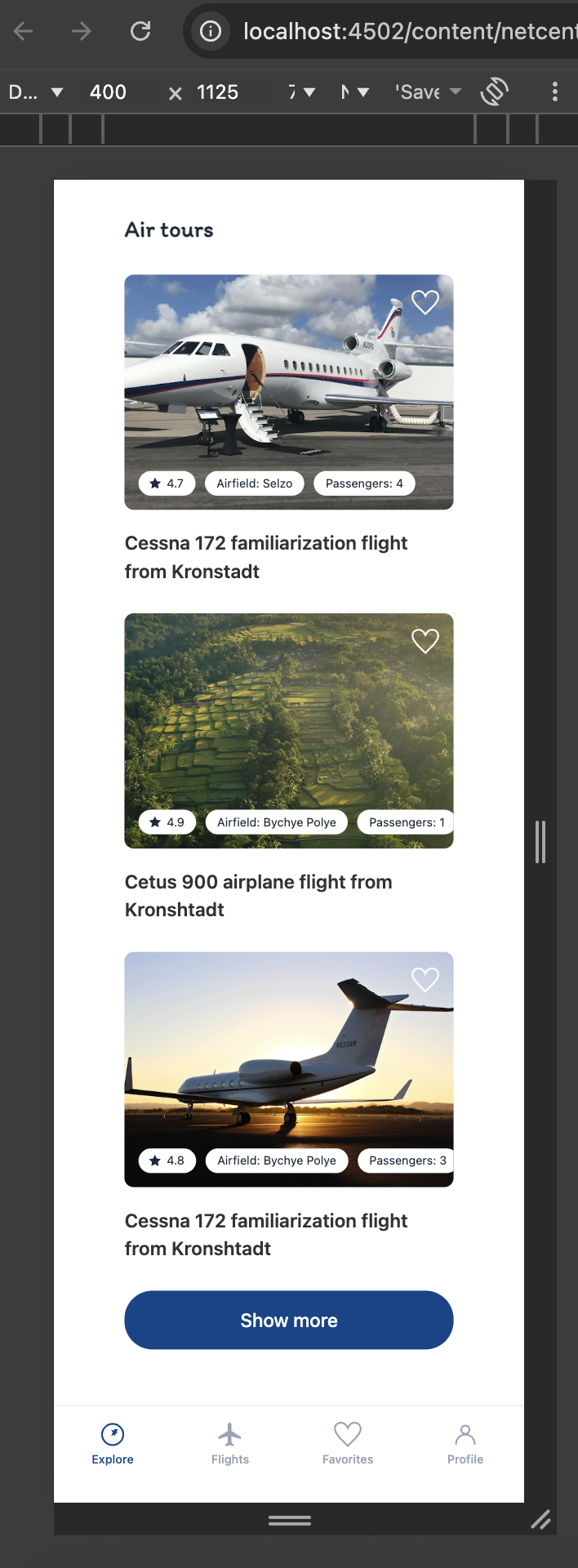
AEM Page — Component Dialog & Rendered Page
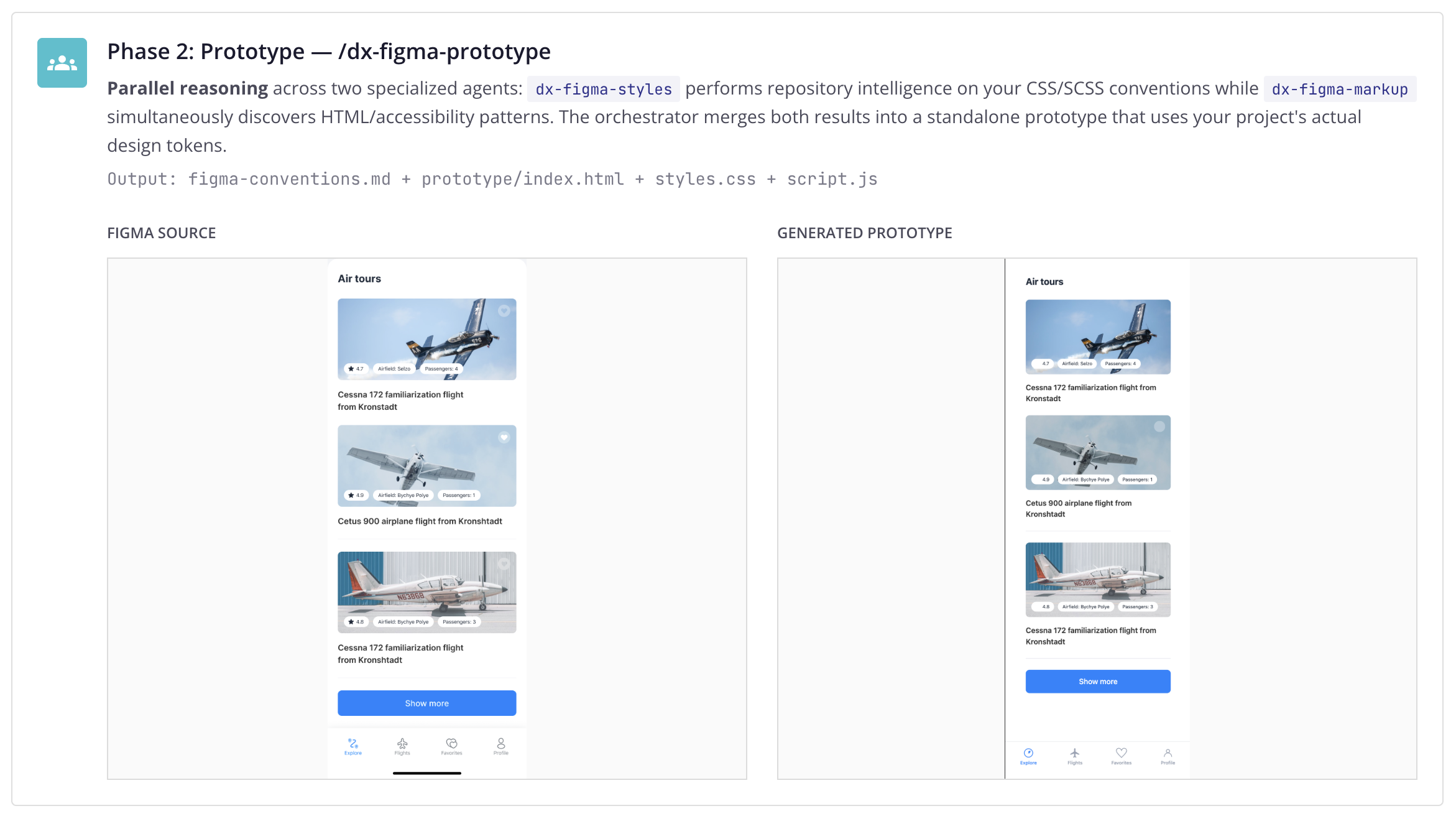
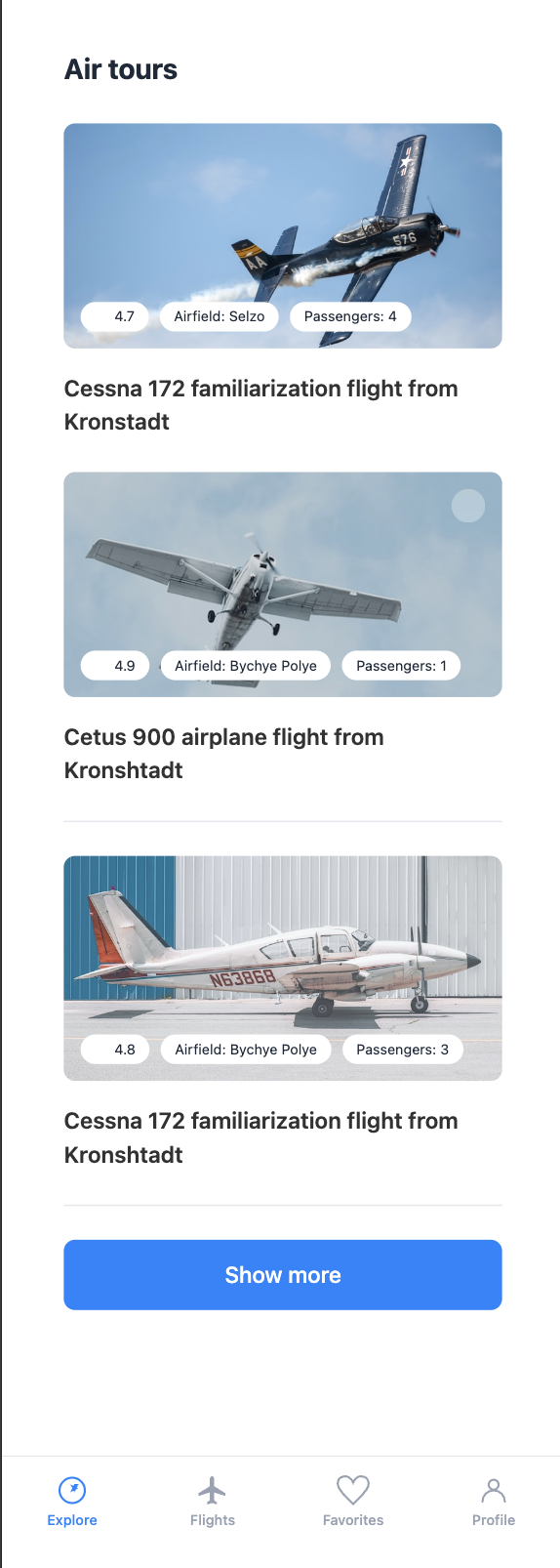
Figma Source vs Generated Prototype
Multi-Agent Figma Orchestration
/dx-figma-all is a coordinator skill. It orchestrates three specialized phases via isolated subagents, validates between each step, and reports progress.
/dx-figma-all https://www.figma.com/design/bQmIeudg9VuIVXMitrvulC/Flights-•-Free-App-UI-Kit—Community-?node-id=97-8157&m=dev
Multi-Agent Orchestration Under the Hood
The coordinator invokes each phase skill directly via Skill() calls — a composable pattern applied to AI agents. Each skill runs in its own isolated context window, performing deep repository intelligence without polluting the orchestrator’s context. Only a compact summary propagates upward. This is context engineering in practice.
Phase 1: Extract — /dx-figma-extract
Live tool use via Figma MCP — pulls the node tree, design tokens, and screenshots directly from the running Figma desktop app. Classifies each layer using adaptive intelligence. Downloads image assets locally.
Output: figma-extract.md + figma-reference.png + assets/
Phase 2: Prototype — /dx-figma-prototype
Parallel reasoning across two specialized agents: dx-figma-styles performs
repository intelligence on your CSS/SCSS conventions while dx-figma-markup simultaneously
discovers HTML/accessibility patterns. The orchestrator merges both results into a standalone prototype
that uses your project’s actual design tokens.
Output: figma-conventions.md + prototype/index.html + styles.css + script.js
Figma Source
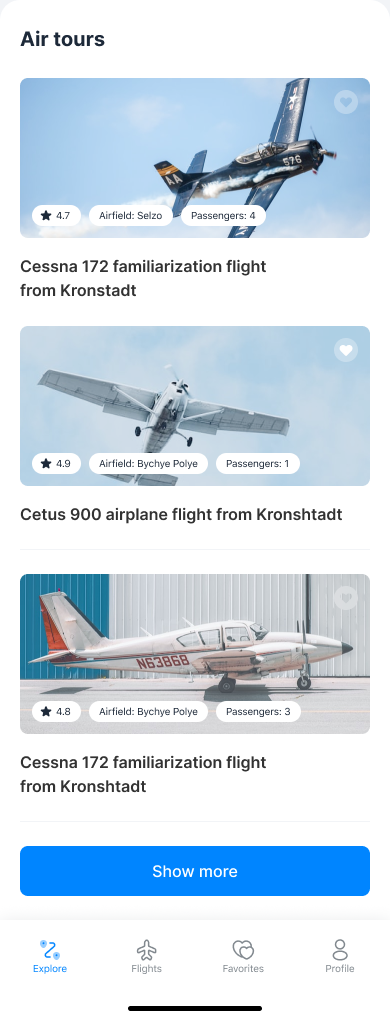
Generated Prototype
Phase 3: Verify — /dx-figma-verify
Closed-loop verification via Chrome DevTools MCP — the agent opens a real browser, renders the prototype, takes a clean screenshot, and compares it against the Figma reference. If visual gaps are detected, the self-healing loop patches CSS/HTML and re-verifies — up to 2 iterations.
Output: figma-gaps.md + prototype-screenshot.png
See It in Action
/dx-figma-all running end to end — extract, prototype, verify — in a single conversation.
Human-in-the-Loop: Manual Step-by-Step
Every phase can also be run individually: /dx-figma-extract, /dx-figma-prototype,
/dx-figma-verify. The developer stays in control — inspect, adjust, iterate between steps.
Same composable skills, two modes: bounded autonomy or supervised execution.
AEM Verification Screenshots
Captured by /aem-fe-verify — the agent creates a test page and configures the component
via AEM MCP (JCR writes), sourcing matching images and text content from the DAM automatically.
Screenshots are taken via Chrome DevTools MCP to verify the rendered output against the Figma reference.
AEM Component Dialog
AEM Rendered Page
Quality Gates -- From Code to PR
Multiple verification layers ensure code quality before a PR is ever created.
/dx-pr-answer Self-Healing
When a build or test fails, the agent detects the error, generates a fix, and retries automatically — up to 3 layers of recovery before escalating. Code reaches the PR stage already verified.
Autonomous PR Review
Every PR gets reviewed automatically. The agent adapts its response based on what it finds.
/dx-pr-review Review with Patches
When the agent finds issues, it provides inline code patches — not just comments. The developer sees exactly what to change, with the fix ready to apply.
Adaptive Responses
Not every finding is a patch. Sometimes the agent asks for clarification, flags a potential concern, or follows up on a previous discussion thread. It adapts to the context.
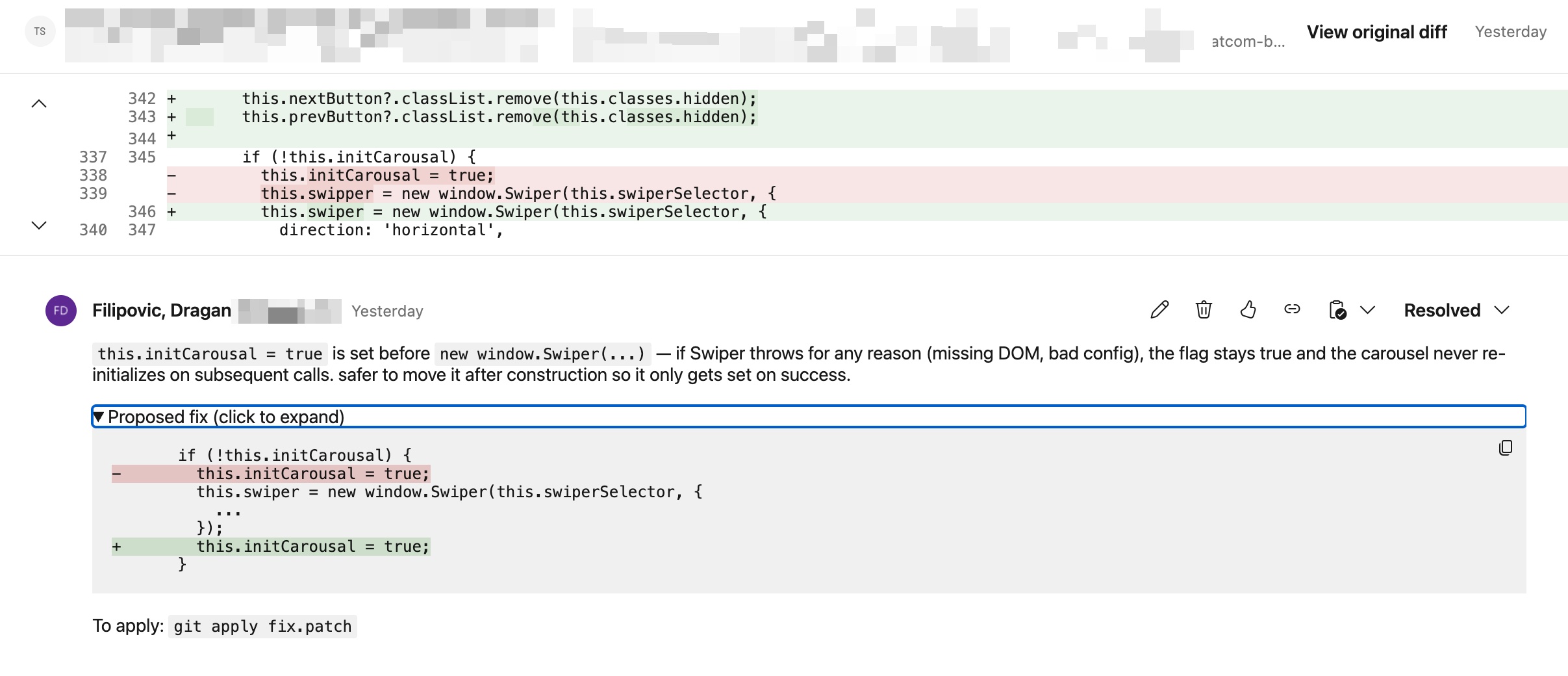
PR Review — Inline Code Patch
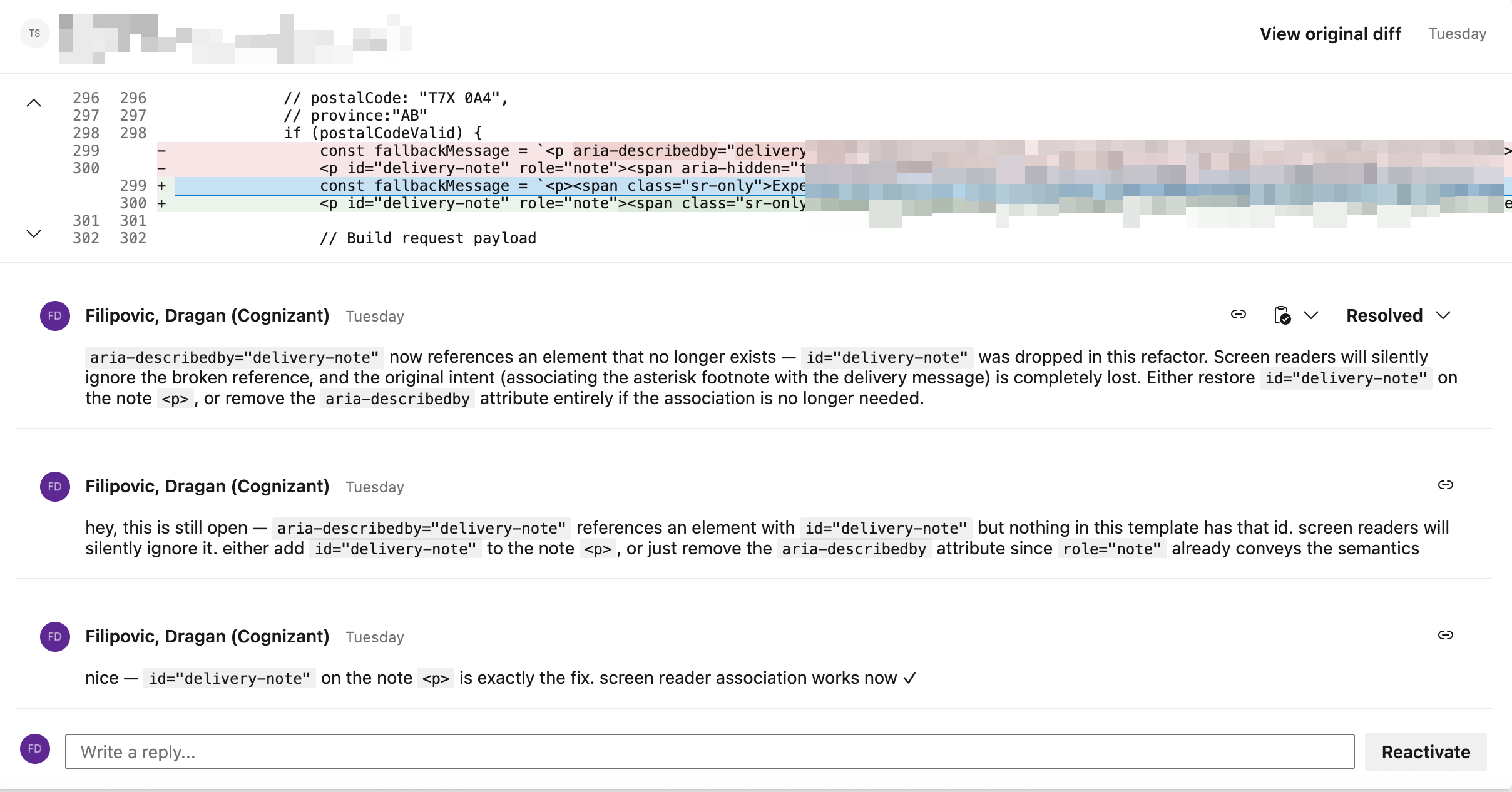
PR Review — Follow-up Discussion
Bug Triage with Browser Automation
The agent opens a browser, reproduces the bug, captures evidence, analyzes root cause, writes the fix.
/dx-bug-triage Real Browser Testing
The agent opens Chrome, navigates to the page, follows reproduction steps, and captures screenshots as evidence. No mocks, no simulations.
Evidence-Based Triage
Root cause analysis posted back to ADO or Jira with screenshot proof, affected code paths, and a proposed fix — before a developer even looks at the ticket.
Fix and Verify
After writing the fix, the agent can verify it by re-running the reproduction steps and confirming the bug no longer occurs.
Built on Enterprise Tools
No custom agent framework. Everything runs on Claude Code CLI and GitHub Copilot CLI -- enterprise-grade, auditable, supported.
Enterprise Runtime
All execution happens via Claude Code CLI or GitHub Copilot CLI — enterprise products with security certifications, not custom agent code.
Security & Cost Logs
Every agent run produces security logs, cost tracking, and audit trails. Full traceability — what was accessed, what was changed, what it cost.
One Codebase, Two Modes
Same skills run locally in the developer’s IDE and autonomously on pipelines (ADO or Jira-triggered). One system to build, maintain, and govern.
Config-Driven
One configuration file runs across connected multi repos. Same plugin codebase, zero code changes per project. Teams customize by adding a file.
Three-Layer Architecture
Modular layers that work independently or together, from foundation to full autonomy.
Layer 3: Automation (24/7)
10 autonomous agents as ADO pipelines — triggered by webhooks, no human needed
Layer 2: Local Workflow (Claude Code + Copilot CLI)
76 skills on both IDEs — requirements, planning, execution, review, PR
Layer 1: Foundation
Project config, coding standards, ADO/Jira integration, self-learning, plugin architecture
Plugin System
4 plugins, each independently installable. dx-core (49 skills, 7 agents), dx-hub (4 skills), dx-aem (12 skills, 6 agents), dx-automation (11 skills, 10 pipeline agents).
Live MCP Integrations
Connected to AEM, Chrome DevTools, Figma, ADO, Jira/Confluence, axe. Agents query live systems — they verify, they don’t guess.
Rate Limiting & Budgets
Token budgets per agent, per run. Rate limiting on API calls. Graceful degradation when limits are hit — never runaway costs.
Before & After
Measurable improvement across every phase of delivery.
| Dimension | Before | After |
|---|---|---|
| Requirements analysis | 1-2 hours manual | 2-3 minutes automated |
| Implementation planning | Informal, in developer’s head | Structured, validated, tracked |
| Code review first pass | Hours (async, waiting) | Instant (automated) |
| PR comment resolution | Days of back-and-forth | Minutes (AI answers + fixes) |
| Documentation | Often skipped | Always generated |
| AEM page creation & config | Manual — dialogs, properties, templates | Automated — pages created and configured |
| Bug triage | Manual detective work | Automated with evidence |
| Knowledge transfer | Tribal, undocumented | Captured in specs and wiki |
10 Agents, 24/7
DoR validation, PR review, bug triage, DevAgent, QA, estimation, documentation — all triggered automatically via ADO pipelines and AWS Lambda. Jira webhook support planned.
Production Proven
Runs daily across multiple projects. DevAgent implements real stories. QA agent files real bugs. Production infrastructure.
Project-Agnostic
4 plugins, independently installable. AEM logic stays in its own plugin. Works with any tech stack across connected multi repos.
Key Demo Commands
Copy-paste ready commands for live demos.
/dx-req <Story-ID>
/dx-plan
/dx-step-all
/dx-step-build
/dx-step-verify
/dx-pr
/dx-pr-review <PR-URL>
/dx-bug-all <Bug-ID>
/dx-figma-all <Figma-URL>
/auto-status
Pre-Demo Checklist
- Terminal open in repo with Claude Code CLI ready
- Figma desktop app open with the design file loaded (for Figma demo)
- Chrome open (for DevTools MCP)
- AEM running locally on :4502 (for AEM demo)
- ADO or Jira browser tabs: Backlog, Pipelines, a PR with review comments
- Clean spec dirs if re-running:
rm -rf .ai/specs/<id>-*/